
A simple, friendly guide to explaining BUY 4 IPTV to your grandparents: what IPTV is, how it works, and how to set it up for them in minutes.
Introduction: IPTV explained like family TV
Trying to explain Internet television to someone who grew up with an antenna can feel impossible. The good news: BUY 4 IPTV is far simpler than it sounds, and your grandparents already understand 90% of it — it is just television that arrives through the Internet instead of a cable or satellite dish.
In this guide, we will show you how to explain the concept in plain words, how to set everything up for them in a few minutes, and why a stable service like BUY 4 IPTV makes the whole experience stress-free for the whole family.
What is IPTV, in one sentence?
IPTV simply means television delivered over the Internet. Instead of a dish on the roof or a cable in the wall, the channels and movies stream through the same Wi-Fi connection the family already uses for phones and tablets.
For your grandparents, nothing changes on the surface: they pick up a remote, open an app, and watch their favorite channels. The only difference is where the signal comes from.
Why grandparents actually love BUY 4 IPTV
BUY 4 IPTV brings together live TV, sports, movies and series in one single subscription — no juggling between five different apps or bills. Everything is in one place, on the TV they already own.
The picture quality goes up to 4K, the electronic program guide (EPG) shows what is on just like a classic TV magazine, and the interface works with a simple remote control. No computer skills required.
Choosing the simplest device for them
If they have a recent Smart TV, the BUY 4 IPTV app installs directly on the television — check our Smart TV installation guide for the exact steps.
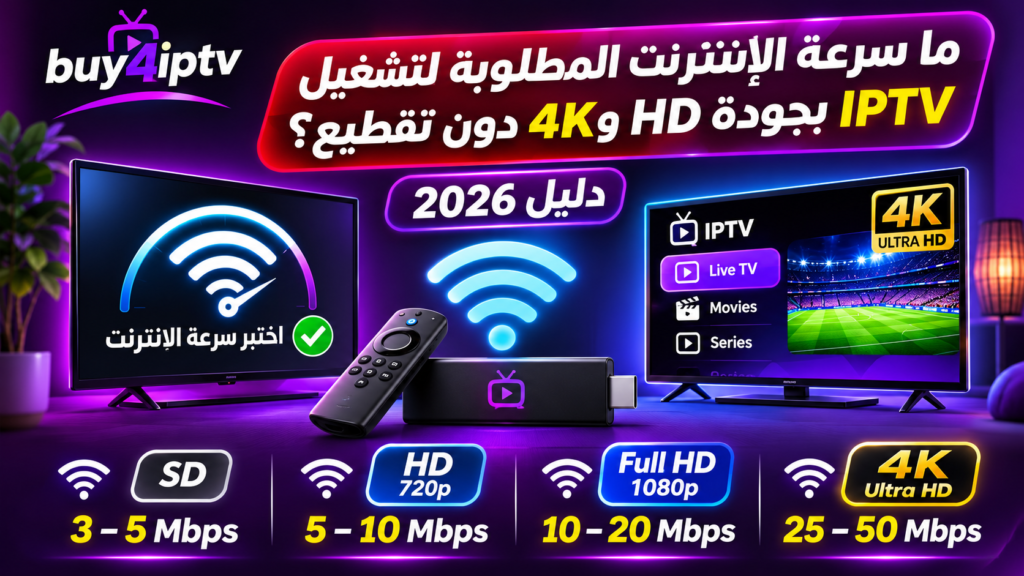
- Fast.com: https://fast.com
- Speedtest: https://www.speedtest.net
If the TV is older, an Amazon Fire TV Stick is the easiest upgrade: plug it into the HDMI port, connect to Wi-Fi, and install the app with Downloader. Our Fire TV Stick tutorial walks you through it in under five minutes.
For a second screen, the service also works on Android phones and tablets, so they can watch in the kitchen or the garden.
Step-by-step: setting it up for them
Step 1 — Order the subscription on the pricing page and keep the confirmation email safe.
Step 2 — Install the app on their TV or Fire TV Stick.
Step 3 — Enter the Xtream Codes or the M3U link received by email: username, password and server URL.
Step 4 — Sit with them once: show them how to open the app, browse channels by country and use the favorites button.
Why BUY 4 IPTV is the easy choice
Not all providers are equal — our IPTV comparison explains what separates a reliable service from a risky one. BUY 4 IPTV stands out with stable servers, a free trial to test the quality, and human support available 7 days a week on WhatsApp.
If anything ever freezes, our buffering troubleshooting guide solves the most common causes in minutes. And if you are still unsure, the ultimate BUY 4 IPTV guide covers every device and every option.
BUY 4 IPTV Buffering in 2026: How to Fix Freezing Step by Step
Frequently asked questions
Is BUY 4 IPTV easy for seniors to use? Yes — once installed, it works like a normal TV: open the app, choose a channel, done. The remote control is the only skill needed.
What do my grandparents need for IPTV? A TV (ideally a Smart TV or a Fire TV Stick), a stable Internet connection of at least 15 Mbps, and an BUY 4 IPTV subscription.
- BUY 4 IPTV Review: Is It a Good IPTV Service in 2026?
- كيفية تثبيت تطبيق IPTV على Smart TV وFire TV Stick خطوة بخطوة
FAQ
Can I set up BUY 4 IPTV remotely for them? Absolutely — you can order the subscription, receive the credentials by email, and configure the app during your next visit in about five minutes.
What happens if they press the wrong button? Nothing breaks. The app always returns to the home screen, and BUY 4 IPTV support is reachable 7 days a week if needed.
نعم، خصوصًا في التطبيقات التي تضبط دقة الفيديو تلقائيًا وفق سرعة الشبكة. وقد تؤدي السرعة غير الكافية إلى انخفاض الجودة أو توقف الفيديو للتحميل.
Final verdict
Explaining IPTV to your grandparents boils down to one idea: same TV, better price, more channels — powered by the Internet. With BUY 4 IPTV, they get 25,000+ channels and VOD in up to 4K, and you get the peace of mind of a reliable service with real support.
Final tip: create a short list of their favorite channels and save them as favorites during setup. It is the small detail that makes the switch feel effortless.