
M3U link or Xtream Codes? Learn the difference and configure Xtreme HD IPTV on any IPTV app: IPTV Smarters, TiviMate, VLC and more.
Introduction: test before you pay
Every BUY4PTV subscription ships with two connection methods: Xtream Codes and an M3U link. Both unlock the same 25,000+ channels — but they work very differently, and choosing the right one makes setup much easier. This guide explains the difference in plain language, then shows you exactly how to configure each method on any IPTV app.
BUY4IPTV
M3U and Xtream Codes: what's the difference?
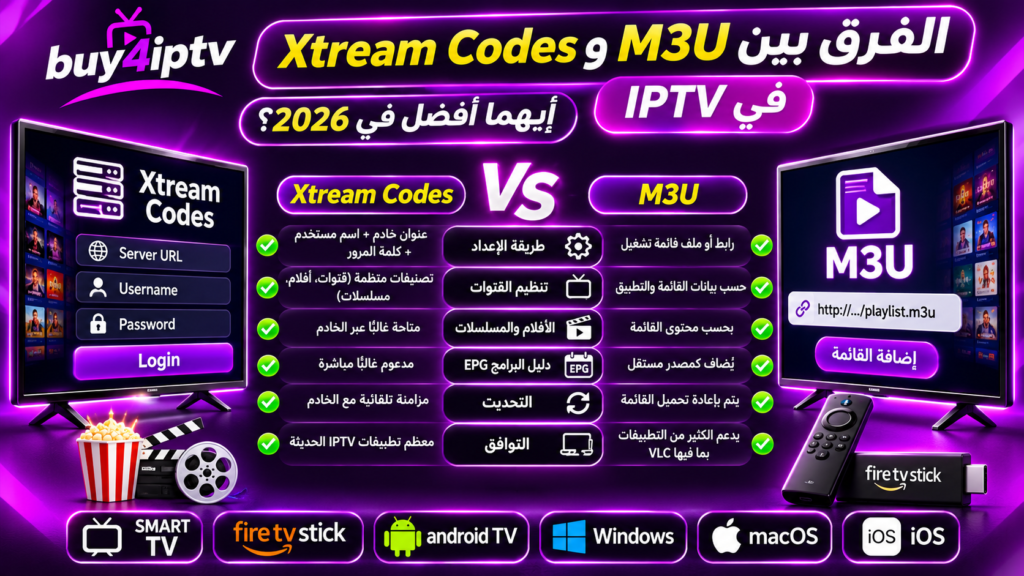
An M3U link is a playlist URL: a single long address containing your entire channel list. It is universal — virtually every IPTV player and even VLC accepts it.
Xtream Codes are three pieces of information — username, password and server URL — that let apps connect to the Xtream Codes API. This method is recommended because it automatically loads channels, VOD posters and the full EPG guide.
Configuring Xtream Codes (recommended)
- In your IPTV app — the official app, IPTV Smarters, 9Xtream or TiviMate — choose 'Login with Xtream Codes
- API'. Enter the username, password and server URL from your subscription email, exactly as received.
- Synchronization takes a few seconds: the complete Xtreme HD IPTV catalog appears organized by country
- and category, with program schedules included.
Configuring the M3U link
Copy the full M3U link from your subscription email — the entire URL, with no spaces. Paste it into the 'Playlist', 'M3U URL' or 'Add playlist' section of your app.
The M3U link works everywhere, including VLC on PC/Mac and simple Smart TV players. Note that some M3U-only apps do not load the EPG automatically — Xtream Codes avoids this limitation.
3. M3U vs Xtream Codes: What's the Difference?
The following table highlights the key differences:
| Feature | M3U | Xtream Codes |
|---|---|---|
| Setup Method | VLC Compatibility | Server URL and login credentials |
| Channel Organization | Depends on the playlist and player | Categories can be retrieved from the server |
| Movies and TV Series | Depends on the playlist content and app | Can be displayed in separate sections |
| EPG (Electronic ProgramGuide) | May require an additional source | May be available through the API |
| Content Updates | By reloading the playlist | By synchronizing data with the server |
| VLC | Supports M3U playlists | Does not natively support Xtream Codes login |